 Meter Max
What you need
- The receipt, or the amount you paid and the date.
Add an expense
-
Open the expense form
On the Home screen, tap + Expense near the top.
Or tap Expenses at the bottom of the screen, then tap Add expense.
-
Choose a category
Tap the box under Category and choose what the money was spent on, for example Fuel or Repairs and servicing. Not sure? See which category below.
Fill in the details
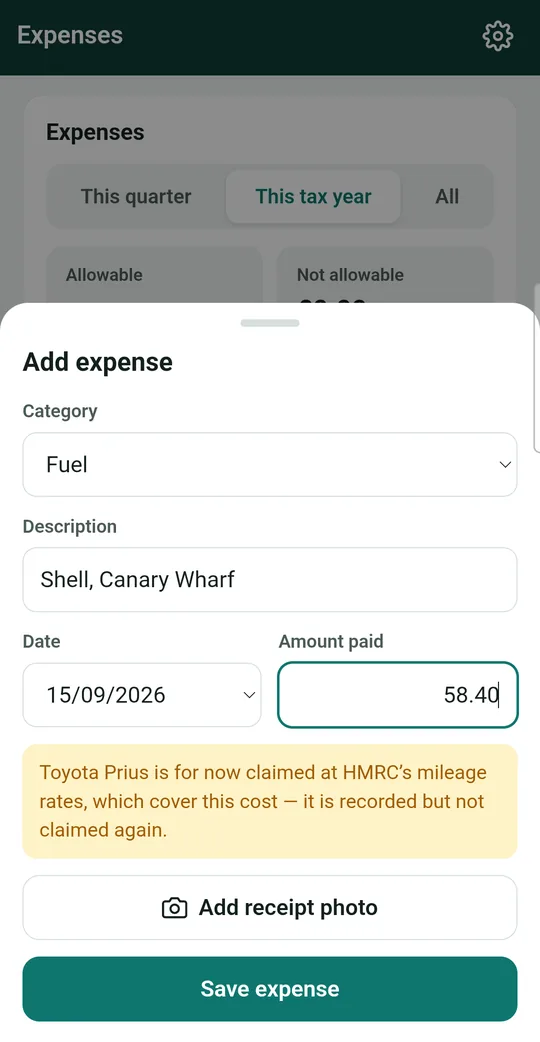
- Description: where or what, for example "Shell, Canary Wharf".
- Date: the day you paid. It starts as today; tap it to change.
- Amount paid: the total on the receipt.
-
Read the green or yellow message
Meter Max tells you in plain English how HMRC treats this cost. For example:
- If you claim your car at mileage rates, fuel is recorded but not claimed again, because the mileage rate already covers it.
- Parking fines are recorded, but never allowable for tax.
You don't need to do anything; it's just so you know.
Some boxes only appear when needed For your phone and "other" costs, you'll see Private use %. If you use your phone half for work and half for personal calls, put 50. If you're VAT registered, you'll also see VAT boxes. -
Take a photo of the receipt
Tap Add receipt photo. Choose to take a photo with your camera or pick one you already have.
Lay the receipt flat, in good light, and make sure you can read the amount and date. The photo is stored safely inside Meter Max on your phone.
The first time, your phone asks if Meter Max may use the camera. Tap Allow. Meter Max only uses the camera when you take a receipt photo.
-
Save it
Tap the green Save expense button. That's it!
Which category?
Pick the closest match. Here's what's in each group:
| Group | Categories |
|---|---|
| Vehicle | Fuel · EV charging · Vehicle insurance (hire and reward) · Repairs and servicing · Tyres and parts · Road tax and MOT · Vehicle hire, rental or lease · Cleaning and valeting · Breakdown cover · Vehicle finance interest · Parking while working · Tolls, congestion and clean air charges |
| Working | App or platform commission · Operator or radio circuit rent · Licences, badge, plating, DBS and medicals · Phone mount, dashcam, bags, small kit · Uniform, hi-vis and protective clothing · Paid to other drivers for work · Equipment bought to keep (laptop, e-bike…) |
| Office | Phone and mobile data · Use of home (flat rate) · Accountant and software · Bank and card terminal charges · Advertising and website |
| Other | Fines and penalties (never allowable) · Other business expense |
Check it worked
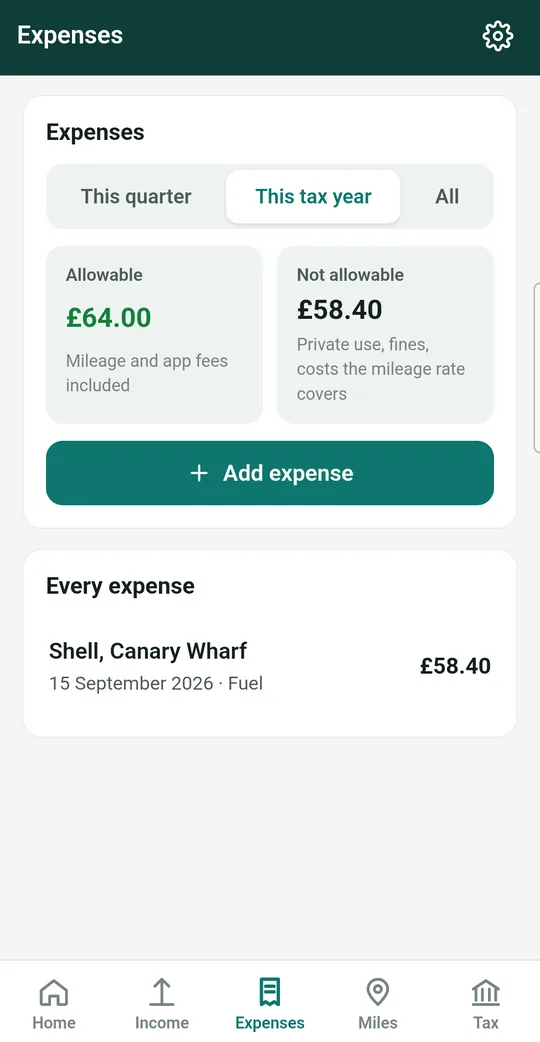
Your expense appears in the Every expense list. A Receipt label shows it has a photo. At the top, Allowable shows the total you can claim, and Not allowable shows costs that can't be claimed, such as fines.
Use This quarter, This tax year or All at the top to change which dates you see.
Handy tips
- Do it straight away. Add the expense while you're still at the petrol pump, so receipts don't pile up in the glovebox.
- Tap an expense in the list to see its receipt photo, change it with Edit, or remove it with Void.
- Keep your receipts. HMRC expects records to be kept for at least 5 years after the 31 January deadline. The photos in Meter Max count, as long as you back up.